
Moving to the UAE or renewing your residency is an exciting time. One of the most important tasks is getting your Emirates ID. This card is your key to daily life in the UAE. It helps you open bank accounts, rent homes, and even get a SIM card. If you are waiting for yours, you probably want to know how to check your emirates id application status.
It is very normal to feel a bit anxious while waiting. You might wonder if everything is okay or when it will arrive. The good news is that the process is very fast and easy today. You do not need to visit an office or wait in long lines. You can track your progress right from your home. In this guide, we will walk you through the steps to stay updated.
Why You Need to Track Your Emirates ID
Your card is more than just a piece of plastic. It is your main proof of identity in the country. If you do not have it, you cannot finish many important tasks. By keeping an eye on your emirates id application status, you can prepare for its arrival. This helps you plan your errands without any stress. When you see your status change, you know you are one step closer to getting your card.
Understanding the Official Channels
The Federal Authority for Identity, Citizenship, Customs, and Port Security (ICP) manages these IDs. They are the only ones who can give you the real status update. Please be careful of fake websites. Only use the official ICP portal or the mobile app. These tools are safe, free, and very user-friendly. They provide real-time updates directly from the government database.
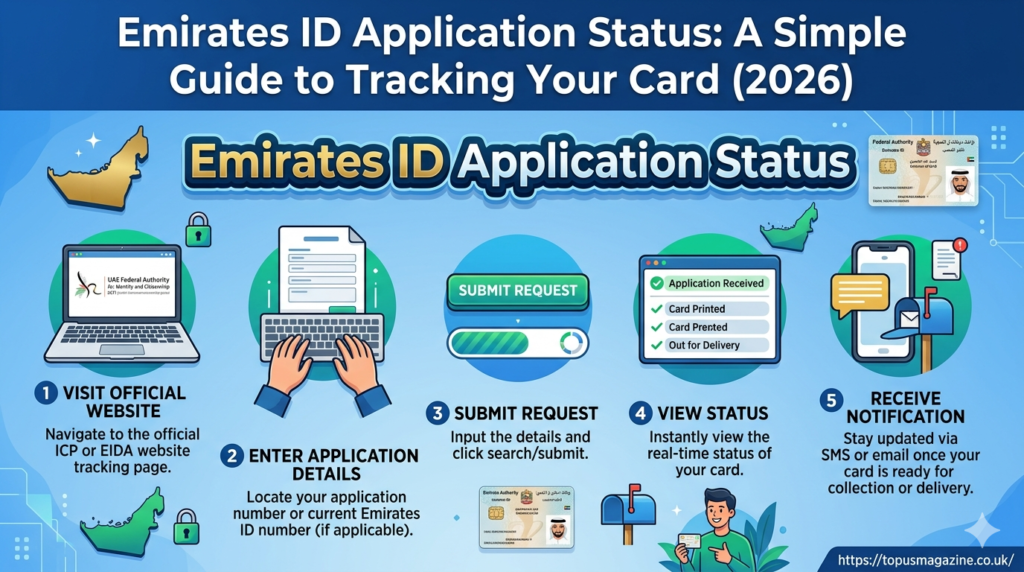
Step 1: Visit the Official ICP Portal
The easiest way to check your emirates id application status is through the website. Open your browser and go to the official ICP website. Look for the “Smart Services” section. There, you will find a link that says “Check Application Status.” It is clearly marked for all users. You do not need to sign in to check your status. It is designed to be simple for everyone to use quickly.
Step 2: Enter Your Application Details
Once you are on the right page, you need to provide some basic information. You can use your application number or your current Emirates ID number. Make sure you type the numbers carefully without any extra spaces. Double-check your entry before you click the search button. This prevents simple errors and helps you get your result faster.
Step 3: View Your Current Status
After you click submit, your emirates id application status will appear on the screen. It will tell you exactly where your card is in the process. You might see terms like “Under Process,” “Printed,” or “Ready for Collection.” These words tell you exactly what is happening. If you see “Ready for Collection,” it means you can go pick it up soon.
Using the ICP Mobile App
If you are always on the go, the mobile app is a great choice. You can download the ICP app from your phone’s app store. Just like the website, you can check your emirates id application status in just a few clicks. The app is perfect for tracking your card while you are out running errands. It is very convenient and keeps all your important info in one place.
Why Does the Status Say “Pending”?
Sometimes, you might see the status “Pending.” Do not worry! This just means the system is still working on your application. It happens often during busy times of the year. Usually, it takes a few days for the status to change. Just check back again after a couple of days. Patience is key during this part of the waiting process.
What to Do If Your Application is Delayed
If your emirates id application status has not changed for a long time, there might be a small issue. First, check that your medical results have been uploaded. Sometimes, a blurry photo can also cause a delay. If everything seems fine, you can call the customer service number. They are very helpful and can tell you exactly what to do next.
Common Reasons for Application Rejection
A rejected application sounds scary, but it is usually a simple fix. Most of the time, it happens because of a mistake in your paperwork. It could be an old photo or a missing document. If you get a rejection, the system will usually explain why. Once you fix that small issue, you can reapply and get your ID approved.
Tips for a Smooth Application Process
To keep your emirates id application status moving fast, follow these tips. Make sure your photo follows all the rules. Use a clear, white background and look straight at the camera. Also, wait at least three days after your medical test before applying. This gives the system enough time to update your health records. These small steps make a big difference.
How to Get Your Card After Approval
Once your emirates id application status says “Ready for Collection,” you are almost done. You will get a message on your phone telling you where to go. Usually, it will be an Emirates Post office. Bring your original passport and a copy of your visa with you. These documents prove who you are when you collect your new card.
Frequently Asked Questions
1. How long does the Emirates ID take to arrive?
Usually, it takes about 5 to 10 working days after your medical results are approved.
2. Is it free to check my Emirates ID status?
Yes, checking your status online or through the mobile app is completely free.
3. What if I lose my application number?
If you lose your number, you can contact the ICP customer service center for help.
4. Can I check my status using my passport number?
Yes, the system often allows you to search using your passport number and nationality.
5. How will I know when my ID is ready?
The government will send you an SMS notification to your registered mobile number.
6. Can someone else collect my Emirates ID for me?
Generally, you must collect it yourself because they might need to verify your identity.
Conclusion
Tracking your emirates id application status is a simple part of your life in the UAE. By using the official ICP tools, you can stay informed and avoid unnecessary stress. Just remember to keep your information handy and check your status once in a while. Once you have your card, you will have easy access to all the services you need. Welcome to your new journey in the UAE!