
What Is a Contactless Push Button?
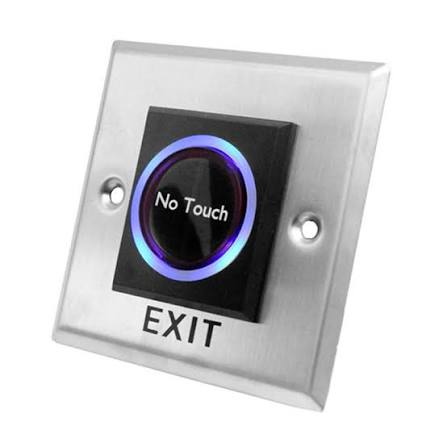
A contactless push button is a control device that allows users to activate a function without physically touching a traditional button. Instead of requiring direct contact, it detects a hand, finger, or nearby object and sends an electrical signal to the connected system.
Contactless push buttons are becoming increasingly popular in commercial buildings, healthcare facilities, offices, public spaces, industrial environments, and smart homes. They can be used to control doors, lights, elevators, automatic equipment, and access systems.
Traditional buttons require repeated physical contact, which can contribute to surface contamination and wear. A contactless design provides an alternative by allowing users to operate equipment from a short distance.
Depending on the model, contactless push buttons may use infrared sensors, capacitive sensing, radar, or other detection technologies.
How Does a Contactless Push Button Work?
A contactless push button generally works by detecting the presence or movement of an object near its sensor.
When a user moves a hand toward the detection area, the sensor identifies the movement or presence. The device then sends a signal to a connected controller, relay, access system, or other electrical equipment.
For example, a contactless button installed near an automatic door can detect a person’s hand and activate the door-opening mechanism. Similarly, a touch-free switch can activate lighting without requiring physical contact.
The exact operating distance depends on the sensor technology and device configuration. Some models offer adjustable sensitivity, allowing installers to control how close an object must be before activation.
Main Technologies Used in Contactless Push Buttons
Different sensing technologies are available for touch-free controls.
Infrared Sensors
Infrared technology is commonly used in contactless switches. The sensor emits infrared energy and detects changes caused by an object entering its detection area.
These systems can provide fast activation and are suitable for many indoor applications.
Capacitive Sensors
Capacitive sensors detect changes in an electrical field when a person approaches the sensor. They can be designed to respond without requiring direct physical contact.
This technology is often used where a clean, modern appearance is important.
Radar Sensors
Some advanced contactless switches use radar-based detection. Radar technology can detect movement or presence and may provide reliable performance in different environmental conditions.
The appropriate technology depends on the application, detection distance, installation environment, and desired performance.
Key Features of a Contactless Push Button
A contactless push button can include several features designed to improve usability and installation flexibility.
- Touch-free activation: Allows users to operate equipment without direct contact.
- Adjustable detection range: Some models allow installers to configure sensor sensitivity.
- LED indicators: Visual indicators can show when the device detects a user.
- Fast response: Quick sensor activation can improve the user experience.
- Weather resistance: Outdoor models may include protection against moisture and dust.
- Durable housing: Strong materials can help the device withstand frequent use.
- Easy installation: Many devices are designed for wall or surface mounting.
- Electrical compatibility: Different models support different voltage and switching requirements.
Before installation, users should check the manufacturer’s specifications to ensure the device is compatible with the intended system.
Benefits of Contactless Push Buttons
Contactless push buttons offer several practical benefits in environments where frequent interaction with controls is required.
Reduced Physical Contact
The biggest advantage is that users do not need to touch the button surface. This can be useful in locations where many people operate the same control.
However, touch-free operation should not be considered a replacement for appropriate cleaning and hygiene procedures.
Convenient Operation
A user can activate the system with a simple hand movement. This can be particularly useful when people have their hands occupied or are carrying objects.
Modern Appearance
Contactless controls can provide a clean and modern appearance. They are available in different shapes, finishes, and designs to suit commercial and architectural environments.
Reduced Mechanical Wear
Because the user does not physically press the button, there may be less mechanical wear compared with conventional push buttons that contain moving components.
Improved Accessibility
Touch-free controls can be useful for people who have difficulty applying physical pressure to traditional switches. Installation height, detection distance, and activation sensitivity should still be selected carefully for the intended users.
Applications of Contactless Push Buttons
Contactless push buttons are used across many industries and environments.
Automatic Doors
One of the most common applications is automatic door activation. A user can wave a hand near the sensor to trigger an automatic door.
These controls are useful in offices, hospitals, retail stores, restaurants, warehouses, and other facilities.
Access Control Systems
Touch-free buttons can be connected to access control systems and electronic locks. They provide a convenient way to request door opening without pressing a physical switch.
Healthcare Facilities
Hospitals and healthcare facilities may use touch-free controls in areas where minimizing shared physical contact is desirable.
Applications can include doors, lighting systems, and other compatible equipment.
Public Buildings
Public facilities such as airports, shopping centers, schools, and transportation stations can use contactless switches for doors and other automated systems.
Industrial Facilities
In industrial environments, contactless controls can be useful where workers need to operate equipment while wearing gloves or where frequent button contact is inconvenient.
The device must be selected according to the environmental and electrical requirements of the application.
Contactless Push Button vs Traditional Push Button
Traditional push buttons require physical pressure to activate a switch. They are simple, reliable, and widely used in electrical and industrial applications.
Contactless push buttons replace the physical pressing action with sensor-based detection. This makes them suitable for applications where touch-free activation is preferred.
Traditional buttons can be more economical in some installations and may work well in environments where physical contact is not a concern. Contactless models can offer greater convenience and a modern user experience.
The choice depends on the application, budget, environmental conditions, installation requirements, and user expectations.
How to Choose the Right Contactless Push Button
Selecting the right device requires careful consideration of several factors.
Detection Distance
Determine how far away a user’s hand should be detected. A short detection range may be suitable for controlled indoor environments, while other applications may require greater flexibility.
Installation Location
Consider whether the device will be installed indoors or outdoors. Outdoor applications may require protection against rain, dust, temperature changes, and other environmental conditions.
Electrical Requirements
Check the device’s operating voltage, current rating, output type, and compatibility with the connected controller or relay.
Material and Design
Choose a housing that can withstand the expected level of use. The appearance may also matter in offices, hotels, healthcare facilities, and retail environments.
Response Time
A fast and reliable response can improve user experience, especially when the button controls doors or other frequently used systems.
Maintenance Requirements
Choose a model that can be inspected and serviced easily. Sensor surfaces should remain clean so that detection performance is not unnecessarily affected.
Installation Considerations
Proper installation is important for reliable contactless push button operation.
The sensor should be positioned at a convenient height and location. Installers should ensure that nearby objects do not unnecessarily trigger the sensor.
The device should be connected according to the manufacturer’s wiring instructions. Electrical work should be performed by a qualified professional when required.
After installation, the detection range and sensitivity should be tested. The installer should verify that the connected equipment responds correctly and that accidental activations are minimized.
Outdoor installations may require additional protection against moisture and environmental exposure.
Maintenance and Troubleshooting
Contactless push buttons generally require limited maintenance, but regular inspection can help maintain reliable operation.
Keep the sensor surface clean using a method recommended by the manufacturer. Dust, dirt, grease, or other buildup may affect detection performance on some models.
If the device activates unexpectedly, check its detection range and nearby objects. Reflections, movement, lighting conditions, or environmental factors may affect certain sensor technologies.
If the button does not respond, inspect the power supply, wiring, controller connection, and sensor settings. Always follow the manufacturer’s troubleshooting instructions.
Regular inspection can help identify damaged cables, loose connections, or other problems before they affect normal operation.
Future of Contactless Control Technology
Touch-free controls are becoming part of broader smart-building and automation systems. Advances in sensors and connected technology are making contactless interfaces more flexible.
Future systems may combine proximity detection with access control, building management systems, smart lighting, and other automated functions.
Improved sensors may also provide more accurate detection while reducing accidental activation. Wireless connectivity and digital controls could further simplify integration into modern buildings.
As businesses and public facilities continue to explore convenient automation solutions, contactless push buttons are likely to remain useful for a wide range of applications.
Frequently Asked Questions
1. What is a contactless push button?
It is a sensor-based control that allows users to activate a connected system without physically touching a traditional button.
2. Where are contactless push buttons commonly used?
They are commonly used for automatic doors, access control, lighting, healthcare equipment, public facilities, and industrial systems.
3. Do contactless push buttons require batteries?
Some models require an external power supply, while certain specialized devices may use batteries. The requirements depend on the product design.
4. Can contactless buttons be used outdoors?
Yes, some models are designed for outdoor use. They should have appropriate protection against moisture, dust, temperature changes, and other environmental conditions.
5. Are contactless push buttons more hygienic?
They reduce the need for shared physical contact with a button surface. However, proper cleaning and hygiene practices remain important.
6. How long do contactless push buttons last?
Service life varies according to sensor technology, construction quality, operating environment, and usage frequency. Devices with fewer mechanical components may experience less physical button wear.
Conclusion
A contactless push button provides a convenient way to control doors, lights, access systems, and other equipment without requiring physical contact. By using technologies such as infrared, capacitive sensing, or radar, these devices can detect a nearby hand or object and send an activation signal.
Their touch-free operation, convenience, modern design, and potential for reduced mechanical wear make them useful in commercial, healthcare, industrial, residential, and public environments.
When selecting a contactless push button, consider detection distance, electrical compatibility, installation conditions, durability, response time, and maintenance requirements. With the right device and proper installation, touch-free controls can provide a practical and user-friendly solution for modern automated systems.